Build Granular Web Filtering Policies with 59 Content Categories, Per-User Controls, and Flexible Allow/Block Lists
Every organization has unique web access requirements shaped by industry regulations, workforce composition, and security posture.
Custom policy management transforms our database of over 100 million categorized domains into a flexible enforcement engine.
The result is a filtering posture that aligns precisely with organizational goals rather than forcing compromises imposed by rigid, one-size-fits-all category lists. This approach reduces both over-blocking, which frustrates productivity, and under-blocking, which introduces risk.
Organize 59 content categories into meaningful groups that map to your organizational structure
The foundation of effective policy management is the category group, a named collection of content categories that represents a conceptual access tier.
Each category group carries a default action (allow, block, warn, or log-only) and an optional redirect URL for blocked requests.
When a domain lookup returns one of the 59 categories, the policy engine evaluates which groups contain that category and applies the highest-priority action.
This layered evaluation ensures that security-critical blocks always take precedence over permissive productivity rules.
Apply the right policy to the right entity at the right scope
Assign filtering policies directly to individual users identified by authentication tokens, IP addresses, or device certificates.
Map filtering policies to directory groups imported from Active Directory, LDAP, or SAML identity providers.
Define policies that apply to entire subnets, VLANs, or site locations.
Policies follow a clear inheritance chain: global defaults are overridden by network policies, which are overridden by group policies, which are overridden by user policies.
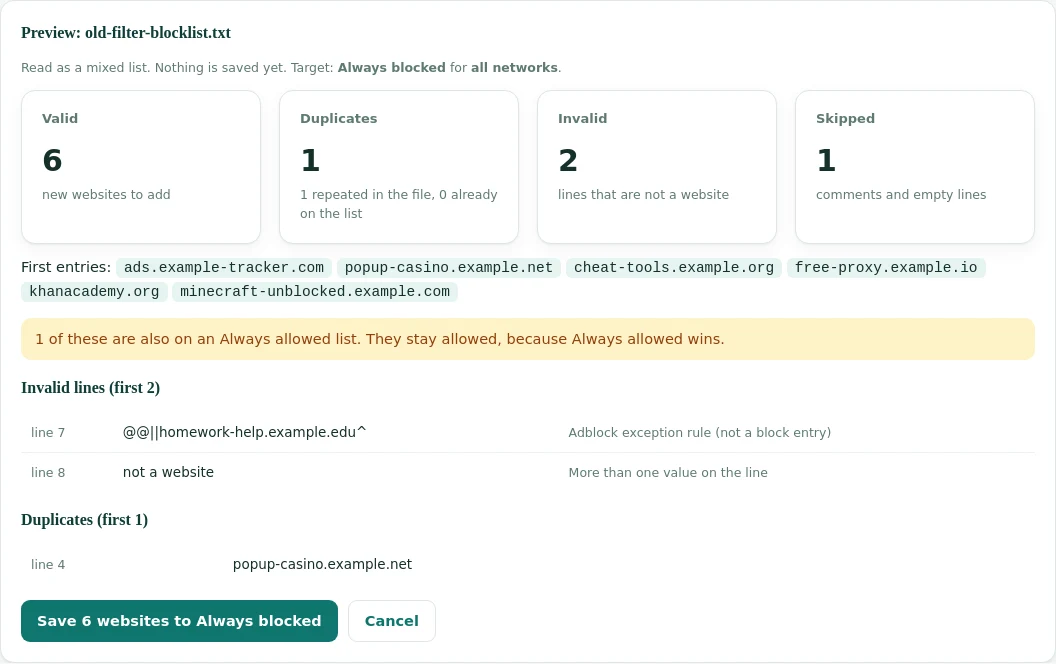
Allow lists guarantee access to specific domains regardless of their category classification.
Block lists enforce denial of access to specific domains even if their category would normally be permitted.
Override tokens allow authorized users to bypass a block for a limited time window.
Policies that evolve throughout the day, week, and calendar year
Define separate policy profiles for business hours and after-hours. During work hours, social media and streaming may be blocked to maintain productivity. After 6 PM, the same users can enjoy relaxed filtering that permits entertainment categories. Transition is seamless and requires no user action.
Accommodate organizations with variable schedules. Retail companies might enforce strict filtering on weekdays but relax policies on weekends when only warehouse staff are active. Educational institutions can apply exam-period restrictions that tighten access to entertainment and social media during testing windows.
Integrate with corporate calendars to trigger policy changes during company events, holidays, or compliance audit windows. Automatically enable stricter filtering during regulatory examination periods, relax policies during company social events, or enforce training-mode filtering during onboarding weeks.
Instantly switch all policies to a pre-configured emergency profile during security incidents. One API call can restrict the entire organization to essential business sites only, blocking all uncategorized and non-critical domains until the security team resolves the content risk and restores normal operations.
Maintain visibility and accountability across your entire policy infrastructure
Delegate policy management through granular admin roles. Global administrators can modify any policy, while departmental admins can only adjust policies within their scope. Read-only auditors can inspect policy configurations and logs without modification rights. All admin actions are authenticated and logged for accountability.
Every policy change creates a versioned snapshot with timestamp, author, and change description. If a policy update causes unexpected access disruptions, administrators can instantly roll back to any previous version. Diff views highlight exactly what changed between versions, making audit reviews efficient and thorough.
Generate reports showing policy configurations, exception lists, override usage, and block statistics organized by category, user group, or time period. Pre-built report templates align with CIPA, HIPAA, PCI-DSS, and SOX compliance frameworks. Scheduled reports can be automatically delivered to compliance officers via email or SFTP.
Before deploying a policy change to production, test it against real traffic patterns using the simulation API. Submit a list of domains and user contexts to see exactly how the proposed policy would classify each request. Compare simulation results against current policy behavior to identify unintended access changes before they impact users.
Automate policy lifecycle through comprehensive REST endpoints
Create, read, update, and delete policies through standard REST endpoints. JSON payloads define category groups, actions, schedules, and scope bindings. Idempotent operations ensure safe retries, and ETags prevent conflicting concurrent modifications by multiple administrators.
Automatically synchronize organizational units, groups, and user attributes from Active Directory, Azure AD, Okta, or any SCIM-compliant identity provider. Policy bindings update in real time as group memberships change, eliminating manual maintenance and ensuring access controls reflect current organizational structure.
Receive real-time notifications when policies are modified, overrides are granted, or block thresholds are exceeded. Integrate with Slack, Microsoft Teams, PagerDuty, or custom endpoints to keep security and compliance teams informed of policy changes as they happen.
Treat filtering policies as infrastructure by storing policy definitions in version-controlled repositories.
Leverage 100 million categorized domains and 59 content categories to create filtering policies tailored to your organization.