webfilteringdatabase.com
Home Find Your Solution
Features
Domain Categorization API Real-Time Classification 58 Filtering Categories Offline Database (120M) SaaS App Hostnames Mobile App Database Managed DNS Filter Content Classification
Industries
K-12 Schools Corporate Healthcare Government ISPs
Tools
Domain Lookup Bulk Categorization Category Explorer
Resources
Pricing API Documentation Login / Sign Up
Managed Service Providers

Web Filtering for Managed Service Providers

Manage web filtering policies across your entire client portfolio with multi-tenant URL classification. 120 million domains, 58 content categories, per-client policy control, and white-label deployment options built for MSP operations.

Full filtering solution · used by US public libraries and schools

We run the web filter for your library or school

Set one DNS address on your router and every device is filtered: CIPA categories blocked, a staff PIN for adult research, and reports for your records. Nothing to install.

From $99 / month per site
See filter plansHow it works

Why MSPs Need Multi-Tenant Web Filtering

Managed service providers face a unique challenge in web filtering: every client has different requirements, different compliance obligations, and different tolerance levels for content restriction, yet the MSP must manage all of these policies efficiently from a single operational platform. A dental practice needs HIPAA-compliant filtering that blocks personal webmail and social media on clinical workstations. A law firm needs to permit broad research access while blocking unsafe content. A school district requires CIPA-compliant filtering with age-appropriate category restrictions.

Managing these diverse requirements through separate filtering products for each client is operationally unsustainable. It creates a management nightmare of different dashboards, different update schedules, different billing models, and different escalation procedures. Technicians waste hours context-switching between platforms instead of resolving client issues.

Our web filtering database provides the classification foundation that MSPs need to build scalable, multi-tenant filtering services. With 120 million domains classified across 58 content categories, MSPs can deploy a single classification engine that serves all clients while maintaining complete policy isolation between tenants. Each client gets customized filtering rules built on the same enterprise URL filtering intelligence.
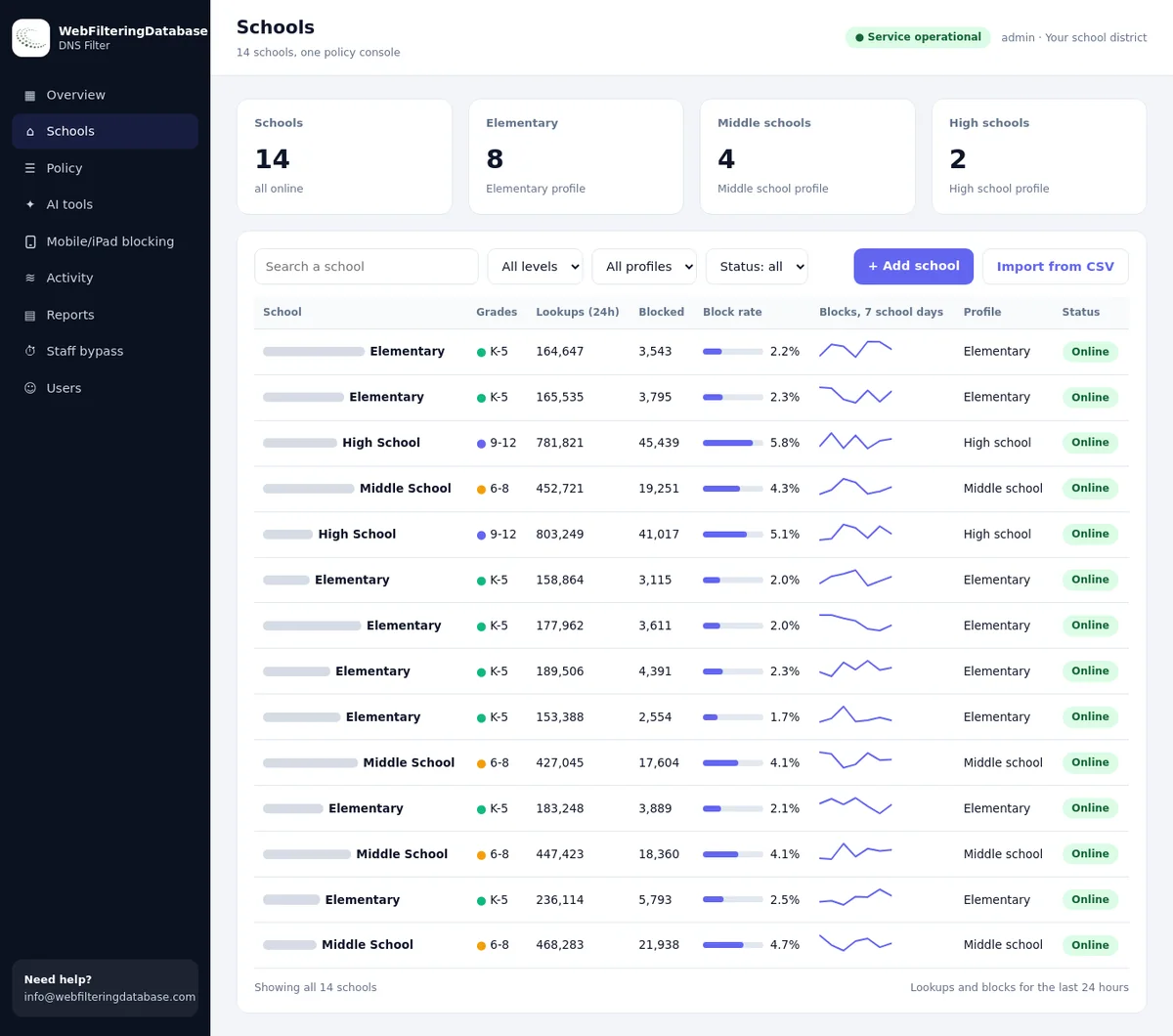
One console, many clients

Run each client's filter from the same dashboard

The managed DNS filter keeps category switches for every site separately, so a dental practice and a design studio can follow different rules. You change a client's DNS address once and manage the rest remotely.

  • Up to 22 blocking categories per site, with allow and block lists on top.
  • List import saves retyping a client's existing exceptions.
  • No appliance to ship and no agent to roll out to client PCs.
Client sites listed together with their own filter settings
Many sites
managed from a single dashboard
1 setting
a DNS address on each client router
120M+
categorized domains driving the rules

Built for MSP Operations

Multi-tenant architecture, scalable licensing, and operational tools designed for service provider workflows

Multi-Tenant Policy Engine

Create and manage distinct filtering policies for each client organization from a single management interface. Define baseline security policies that apply to all clients, then layer client-specific customizations on top. When a new content risk category emerges, update the baseline once and every client benefits immediately without individual policy changes across your portfolio.

Per-Client Customization

Every client environment is different. A healthcare clinic needs strict HIPAA controls. A creative agency needs access to social media and design platforms. A financial advisor needs streaming blocked but investment research sites accessible. Our 58-category taxonomy gives MSP technicians the granularity to build precise policies for each client without writing complex custom rules or maintaining per-client exception lists.

Client Reporting & Dashboards

Generate branded client-facing reports that demonstrate the value of your filtering service. Show clients how many content risks were blocked, which categories their employees access most frequently, and how their filtering policy compares to industry benchmarks. Scheduled reports automate monthly business review documentation and reduce the preparation time your account managers spend before QBRs.

White-Label Deployment

Present web filtering as your own branded service rather than a third-party product. Customize block pages with your MSP logo and support contact information. Client-facing portals display your branding throughout. White-label support means your clients see you as the provider of their web filtering service, strengthening your relationship and reducing the risk of disintermediation.

Scalable Licensing for Growing Portfolios

MSP economics require predictable costs that scale proportionally with revenue. Adding a new client should increase your filtering costs only marginally, not require purchasing a new appliance license or hitting a higher pricing tier. Our per-endpoint licensing model aligns your classification costs with your billing, maintaining healthy margins regardless of portfolio size.

As your client count grows from 20 to 200 organizations, the same classification database serves all of them. There are no per-tenant database fees, no client onboarding charges, and no volume limits that force you into expensive enterprise tiers before your revenue justifies it. Volume discounts reward growth automatically, improving your margins as your MSP scales without requiring license renegotiation.

Staff on the road

Keep a client's laptops covered away from their office

A private encrypted link holds the same policy on devices outside the network, and it helps where a provider redirects DNS. Your client's rules follow the person, not just the router.

Rapid Client Onboarding

When an MSP wins a new client, time to value matters. The faster you deploy security services, the sooner you demonstrate your value and the sooner that client begins generating recurring revenue. Complex web filtering deployments that require weeks of configuration, custom rule writing, and testing delay revenue recognition and strain implementation resources.

Our pre-built industry policy templates dramatically accelerate client onboarding. When you sign a dental practice, select the healthcare template that blocks personal webmail, social media, and streaming while permitting dental supply vendors, insurance portals, and medical reference sites. When you add a law firm, the legal template provides broad research access with strict unsafe content protection. Templates are starting points that your technicians customize in minutes rather than building from scratch.

DNS-based deployment simplifies the technical implementation. Point the client's DNS to your filtered resolvers and protection begins immediately. There is no software to install on endpoints, no proxy certificates to distribute, and no browser extensions to manage. This approach works across all client devices and operating systems without requiring MDM integration or administrative access to individual workstations.

Supporting Client Compliance Requirements

Many MSP clients operate in regulated industries where web filtering is not optional but required. Healthcare organizations must implement technical safeguards under HIPAA. Financial services firms need controls for GLBA and PCI-DSS compliance. Schools receiving E-Rate funding must maintain CIPA-compliant filtering. Legal firms need to demonstrate reasonable security measures to protect client confidentiality.

As the managed service provider, your clients look to you to deliver the filtering controls that their compliance frameworks require. Failing to provide adequate filtering exposes both the client and the MSP to regulatory liability. Audit findings that cite insufficient web access controls reflect poorly on the MSP and create retention risk during the remediation period.

Our 58-category taxonomy maps to the content restrictions specified in all major compliance frameworks. When a healthcare auditor asks how your client prevents access to unauthorized file-sharing services, you can demonstrate category-level blocking with documented policy enforcement. When a school undergoes a CIPA compliance review, your filtering logs provide the evidence that prohibited content is blocked across all student-accessible devices throughout the school network.

Different clients, different labels

Business tools and distractions in our category data

An MSP rarely applies one rule to all clients. These stored categories show why category switches fit mixed portfolios.

SiteCategories
squareup.comBusiness, Financial Services
shopify.comBusiness, Web-based Applications
slack.comEmail and Messaging
gmail.comEmail and Messaging
hulu.comStreaming Media
reddit.comSocial Networking, Forums / Message Boards, Community Sites

MSP Web Filtering Use Cases

How managed service providers deploy URL classification across diverse client portfolios

1

Healthcare Client Protection

Deploy HIPAA-aligned web filtering for medical and dental practices that blocks personal webmail services, social media platforms, unauthorized cloud storage, and all content risk categories while permitting access to electronic health record systems, insurance verification portals, medical reference databases, and pharmacy networks. Generate compliance documentation showing that technical safeguards for ePHI access are actively enforced across the practice network.

2

Multi-Location Retail Client

Manage consistent web filtering policies across a retail client with 15 store locations. Restrict point-of-sale terminals to approved payment and inventory sites only. Allow back-office workstations broader access for vendor management and human resources while blocking categories that pose PCI-DSS compliance risks. Centrally manage all locations from a single policy profile with location-specific exceptions where needed.

3

Education District Deployment

Provide CIPA-compliant content filtering for a school district with elementary, middle, and high school buildings. Apply age-differentiated filtering policies that are more restrictive for younger students and progressively less restrictive for older students. Give teachers bypass capabilities for educational content that falls into otherwise blocked categories. Produce E-Rate compliance reports for district technology coordinators on a scheduled basis.

4

Professional Services Firm

Configure web filtering for a law firm or accounting practice that needs broad internet access for research and client service while maintaining strict security controls. Block unsafe content, and command-and-control categories without restricting the wide range of legitimate web resources that professionals need. Enable granular logging that supports the firm's data governance and client confidentiality obligations.

120M
Domains Classified
58
Content Categories
99.5%
Classification Accuracy
<5ms
API Response Time

Service delivery: DIY lists or a managed filter

What your technicians carry in each model.

MSP taskRouter lists per clientManaged DNS filter
Initial setupType blocked domains on every deviceSwitch categories and set one DNS address
Overview of all clientsLog in router by routerOne dashboard, many sites
Client asks for an exceptionEdit config, remember to undo itAllow list, or a staff PIN for 15, 30 or 60 minutes
Evidence for a client reviewScreenshotsSearchable activity, reports and CSV exports
Remote employeesNot coveredPrivate encrypted link on the device
Open the product pageRequest an MSP pilot

Pricing depends on how many client sites and devices you manage. Trying one client site first shows you the blocks and reports before you roll out more.

Scale Your MSP Filtering Services

Deploy multi-tenant web filtering across your entire client portfolio. Per-endpoint licensing, white-label support, and industry policy templates for rapid client onboarding.