Web filtering database specification: fields, files and delivery
Before anyone signs a data licence, an engineer has to answer one question: what exactly arrives, and will it fit our product? This page is that answer, field by field.
It covers each row, the file formats, the tiers, how updates arrive and what a deployment needs. Prices and licence terms are on the pricing and OEM pages.
At a glance
- One row
- One registrable domain, such as example.co.uk
- Coverage
- Tiers from 1 million to more than 120 million domains
- Categories
- 58 web filtering categories, several per domain, ranked
- Taxonomy two
- IAB Content Taxonomy v2 and v3, tiers 1 to 4
- Extra fields
- Personas, popularity score, country, rank groups
- Formats
- CSV and Parquet, JSON available
- Updates
- Quarterly to daily by plan, new domains every day
- Access
- Files in your own systems plus a lookup API
The fields in each row
The full field set as delivered on the larger tiers. Smaller tiers carry a subset; your quote lists the fields for your tier.
| Field | Type | Example value | What it holds |
|---|---|---|---|
| Domain | Text | example.com | The registrable domain in lower case, without www, protocol or path |
| Web Filtering Category | Text, pipe-separated | Shopping|Marketplaces / Classifieds / Auctions | Every category of the 58 that the domain fits, ranked by how much of the site each describes |
| IAB v2 Tier 1 to 4 | Text, four fields | Technology & Computing > Computing > Internet | The IAB Content Taxonomy 2.x path, as deep as it applies |
| IAB v3 Tier 1 to 4 | Text, four fields | Same structure | The IAB Content Taxonomy 3.x path, for teams on the newer version |
| Personas | Text, semicolon-separated | Software Developer; Data Analyst | Audience personas associated with the site |
| Popularity score | Number, 0 to 10 | 10.0 | The domain's standing on the web; higher is more prominent |
| Country | Text | United States | The country the site mainly serves, empty when no single country applies |
| Global Popularity Rank Group | Text band | 1-1000 | The band of the domain's position in the global ranking |
| Country Level Popularity Rank Group | Text band | 1000 | The band within its country, a dash when there is no country |
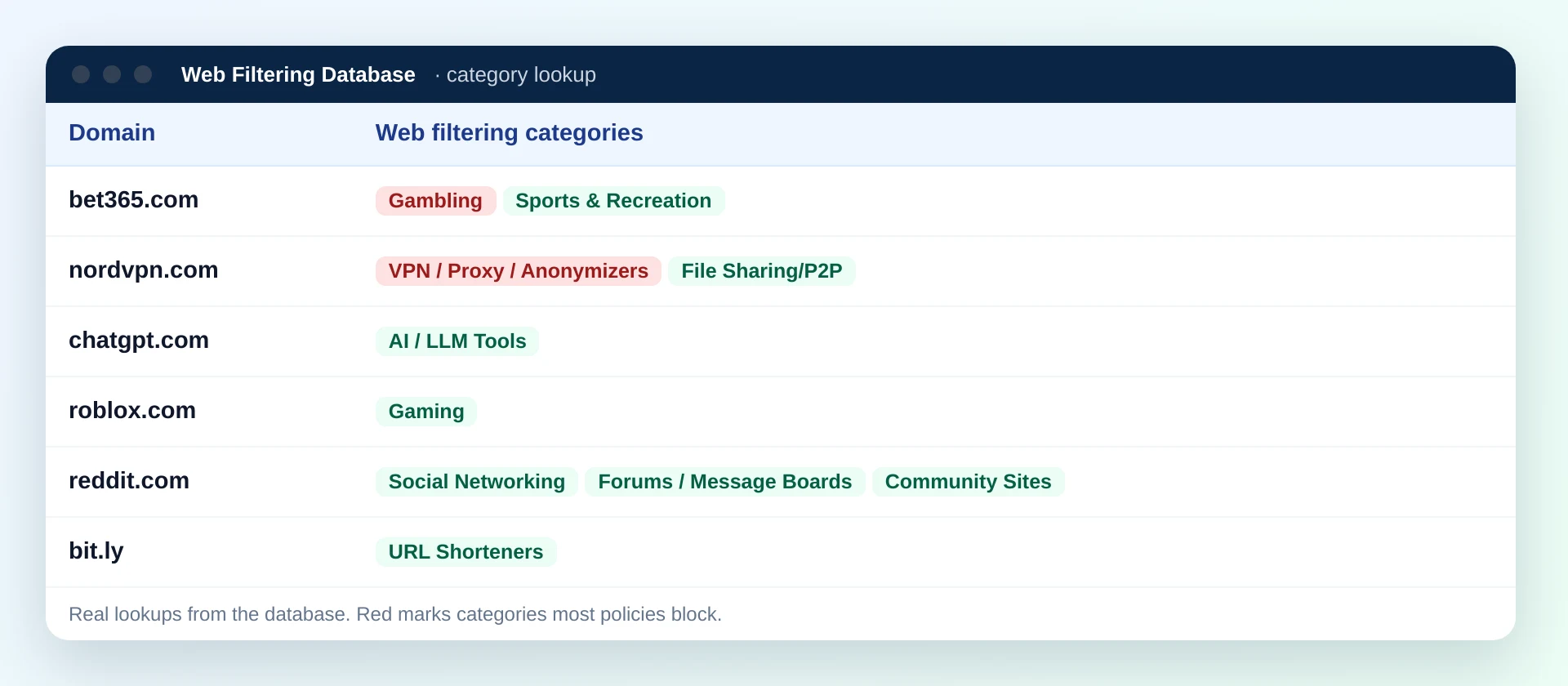
The category field is the one most products read. Split it on the pipe character; the first value is the main category. Some domains carry four or more categories, so never assume a fixed number of values.
Two taxonomies and the popularity fields in one licensed file
The rows described above are what licence holders load into their own systems. One file serves filtering decisions, reporting and analytics, so product, security and data teams work from the same source.
- Web filtering categories for block and allow rules.
- IAB labels for reporting and content analytics.
- Popularity fields to size on-device lists or set priorities.
File formats
The same rows in the shape your system reads best. Most teams take one main format and one export shape for their enforcement point.
For loaders and scripts
UTF-8 with a header row and comma separators. Multi-value fields use a pipe or semicolon inside the cell, so standard CSV readers work unchanged.
For warehouses and analytics
Columnar and compressed, so a single field such as the category can be read without scanning the rest. Suits data lakes and query engines.
For applications
One object per domain, convenient for services that already speak JSON and for building in-app lookup tables.
The export shapes above are available to licensed customers for their enforcement points. Each is described in DNS blocklist formats.
Five rows showing how the category value is written
Real lookups from our data, shown with the raw value exactly as it appears in the file, pipe characters included.
| Domain | Web Filtering Category value | Main category |
|---|---|---|
| wikipedia.org | Education/Reference | Education/Reference |
| nytimes.com | News/Media|Political | News/Media |
| etsy.com | Shopping|Marketplaces / Classifieds / Auctions | Shopping |
| espn.com | Sports & Recreation | Sports & Recreation |
| steampowered.com | Gaming | Gaming |
Tiers and what each covers
Tiers are cut by popularity, so a smaller tier holds the most visited domains rather than a random sample.
1M
The most popular domains, as a one-time snapshot.
From $999Starter
Internal use, single deployment, quarterly refresh with subscription.
$2,499 plus $499 a year refreshGrowth
Popularity and country fields, quarterly refresh.
QuotedProfessional
For enterprise filtering, monthly refresh available.
Quoted per deploymentEnterprise
Global coverage with delta feeds, weekly or daily refresh.
Quoted per deploymentThe 20 million most visited domains cover 99.99% of web traffic and usage, which is why most filtering products start there and use the lookup API for the rest.
How updates arrive
A category database is only as good as its last refresh. Four things keep yours current.
New domains, daily
About 300,000 newly registered domains are categorized every day and delivered as daily delta files on plans that include them.
Second and third look
Each new domain is checked again after a week and after a month, because many sites add content after launch.
Scheduled refreshes
The full file is refreshed on the schedule of your plan, from quarterly up to daily.
The lookup API
For any domain not yet in your copy, the included API returns its categories on request.
Loading the data: four common patterns
How teams put the file to work depends on where the decision is made. All four run without calling us at decision time.
In-memory map
Domain to category, held in RAM by a resolver or proxy. Fastest, and sized by tier: the web filtering fields of the 20 million tier take about 1.2 GB as plain CSV before compaction.
Embedded key-value store
For appliances and routers with limited memory. Load the popular subset, keep it on flash, look up by domain.
SQL table
For reporting and enrichment. Index on domain, keep the category field as text and split it when you query.
DNS policy zone
Generate a response policy zone per category set and let the resolver enforce it. See DNS filtering integration.
Matching sub-domains: rows are registrable domains, so look up a host by trimming labels from the left until you reach the registrable part. A public suffix list handles endings such as .co.uk correctly.
How licence holders show the quality of the data
Regular manual validations measure accuracy, and validation reports with the measured accuracy of the CIPA categories are available to licence holders, quarterly or monthly on request. Product teams pass them on to customers who ask how good the filtering data is.
When a domain is not in your copy
Every tier ends somewhere, and brand-new domains appear between deliveries. Decide in advance what your product does with a domain it cannot find.
| Approach | How it works | Suits |
|---|---|---|
| Ask the API | Look the domain up through the included API and cache the answer | Gateways and cloud services with outbound access |
| Allow and log | Let the request through, record the domain for the next review | Business networks where over-blocking costs more than a rare miss |
| Block on strict profiles | Treat unknown domains as blocked only where the profile is strict | Children's devices and public terminals |
| Wait for the delta | Rely on the next daily delta file for newly registered domains | Offline and air-gapped deployments |
An integration checklist for the engineering team
Eight decisions that make the first load go smoothly. Most teams settle them in one planning session.
Tier and fields
Confirm which fields your tier includes and which ones your product will actually read.
Main or all categories
Decide per setting whether a rule reads the first category or every one in the row.
Sub-domain matching
Trim hosts to the registrable domain with a public suffix list before the lookup.
Format and export
Pick the main format and any export shape your enforcement point needs.
Refresh without downtime
Load each delivery into a new table or file and switch over in one step.
Unknown domains
Choose one of the four approaches above and apply it consistently.
Map categories to settings
Group the 58 categories into the switches and presets your users will see.
Support lookups
Give your support team a quick way to see a domain's row when a customer asks why it was blocked.
Licence terms in brief
The specification tells you what arrives. The licence says how you may use it. In short:
Covered by licence types
- Internal use inside your organisation
- OEM use embedded in a product you sell
- Group-wide use across several products or brands
Not allowed
- Resale of the raw data
- Publishing the rows or the lists
- Passing the files to third parties outside the licence
Where to read more
- OEM licensing for products
- Pricing for the starter tiers
- The lookup API included with licences
Assembling a domain dataset yourself, or licensing this one
The work behind each line of the specification.
| Specification line | Built in house | Licensed file |
|---|---|---|
| A row for every popular domain | Collect and keep a domain list current | Tiers from 1 million to 120 million+ rows |
| Ranked categories per domain | Define a taxonomy and label millions of sites | 58 categories, ranked, several per row |
| IAB labels to tier 4 | A second labelling project | v2 and v3 in the same row |
| New domains | A daily pipeline of your own | About 300,000 categorized every day |
| Quality evidence | Your own validation programme | Validation reports for licence holders |
| Formats for enforcement | Converters you maintain | CSV, Parquet, JSON and export shapes |
Specification questions
What format is the web filtering database delivered in?
As CSV and Parquet files, with JSON available, plus export shapes such as hosts files, DNS response policy zones, firewall lists and PAC files for licensed customers who need them.
What fields does each row contain?
The domain, its web filtering categories in rank order, IAB Content Taxonomy v2 and v3 labels to tier 4, audience personas, a popularity score, the main country and two popularity rank groups. The fields available depend on the tier.
Can a domain have more than one category?
Yes. A domain carries every web filtering category it fits, separated by a pipe character and ranked by how much of the site each one describes. The first one is the main category.
How often is the database updated?
Refresh deliveries are scheduled by plan, from quarterly to daily. About 300,000 newly registered domains are categorized every day and checked again after a week and after a month.
Is there an API as well as the files?
Yes. A lookup API is included with database licences, for single lookups and for domains that are not yet in your local copy.
How large are the files?
It depends on the tier and the fields. As a guide, the web filtering fields alone for the 20 million most visited domains take about 1.2 GB as plain CSV; Parquet is much smaller, and the full field set is larger.
Are categories assigned per domain or per page?
Per registrable domain. That suits DNS filters, firewalls and other products that see the host name, and sub-domains inherit the categories of their domain unless your product adds its own rules.
Can the database run in an air-gapped network?
Yes. The files run inside your own systems with no outside calls, and update files can be brought in through your own transfer process.
The 1 million most popular domains start at $999 and the 5 million starter tier at $2,499; larger tiers and OEM licences are quoted per deployment. Send us your product type and expected volume, and the quote will list the exact fields and refresh schedule.
Need the specification for your tier in writing?
Tell us where the data will run and which fields you need. We will send the field list, formats and refresh schedule with the quote.