Web content filtering policy: how to write one people will accept
The filter decides what is blocked. The written policy explains it. This guide is for office managers, IT leads, librarians and IT providers who need that document: what it must say, who signs it, and how to keep it short enough that people actually read it.
Most good filtering policies fit on two pages. The work is in the decisions, not the writing.
A filtering policy answers six questions
- What is filtered, and why?
- On which networks and devices?
- What is deliberately left open?
- How do I ask for a site to be opened?
- What is recorded, and who can see it?
- Who owns this policy, and when is it reviewed?
Why a written policy is worth an afternoon
Filters without a policy work until the first complaint. Then every decision looks personal, and every exception looks like a favour.
Fewer tickets
People who know the rules ask fewer "why is this blocked" questions, and ask better ones.
Something to show
Auditors, insurers, funders and boards ask for the policy before they ask for settings.
Consistent decisions
A written exception process turns "can you open this?" into a rule, not a negotiation.
Privacy in the open
Saying what is recorded, and what is not, is expected under EU and UK data law and calms everyone else.
Clean handover
When the IT person or provider changes, the next one inherits reasons, not just switches.
Turn each line of the policy into a switch, a list or a schedule
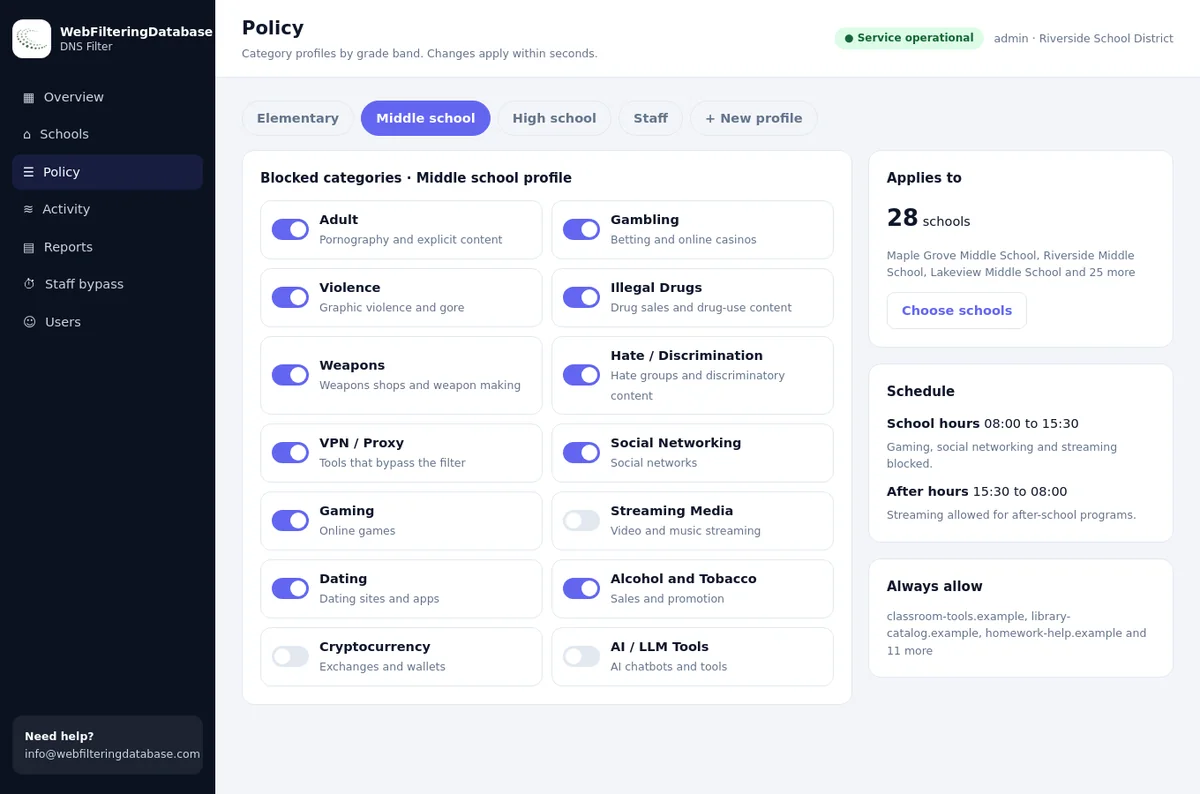
Our managed DNS filter maps directly onto the sections of a written policy. Categories per network, an always-allow list for agreed exceptions, a staff PIN for research and time schedules cover almost every rule a policy contains.
- One profile per network: staff, guests, public PCs.
- Agreed exceptions go on the always-allow list in seconds.
- A printable policy record per network for your files.
The ten sections of a web filtering policy
Use these as headings. Each needs two to four sentences, and the green line under each is an example you can adapt.
Purpose and scope
Why the organisation filters, and which people the policy applies to.
"We filter our networks to protect people and data and to meet our legal duties."Networks and devices covered
Name each network and say whether laptops are filtered away from the office.
"This applies to the staff Wi-Fi, the guest Wi-Fi and the public PCs."What is blocked, and why
List the categories in plain words, grouped by reason: safety, legal risk, security.
"Adult, gambling and illegal drug sites are blocked on every network."What is left open on purpose
Saying what stays open prevents silly tickets and shows the policy is proportionate.
"News, social media and personal email remain open on staff Wi-Fi."How to ask for an exception
One route, the information you need, and how quickly people can expect an answer.
"Send the full address and the reason to the named contact."Research access for staff
Who may open blocked categories for work, for how long, and how it is recorded.
"Staff may use the PIN to open adult categories for research for up to an hour."What is recorded
The data the filter keeps, who can see it, and how long it is kept.
"The filter records website names, times and networks, not page contents."Personal devices and guests
Whether phones and visitors' devices on your Wi-Fi follow the same rules.
"Any device on our Wi-Fi follows the rules for that network."Breaches and bypassing
What counts as getting around the filter and what normally happens next.
"Using a VPN or proxy to avoid the filter is treated as a breach of this policy."Ownership and review
Who owns the policy, who approved it, and when it will next be reviewed.
"Owned by the operations manager, reviewed every October."Choosing categories by network
Most policy arguments disappear once each network has its own rules. A typical starting point, using category names from our filter:
| Network | Typically blocked | Usually left open | Note for the policy |
|---|---|---|---|
| Staff Wi-Fi and desks | Adult, Gambling, Illegal Drugs, Weapons, Hate/Discrimination, Parked / For-Sale, Remote Access Tools except your IT provider's tool | News, social networks, streaming, shopping | Security and legal risk first; productivity rules only if a real problem exists |
| Guest Wi-Fi | Adult, Gambling, VPN / Proxy, File Sharing/P2P | Almost everything else | Protects your connection's reputation and other guests |
| Public or children's PCs | Adult, Lingerie, Dating, Gambling, Weapons, Violence, Alcohol, Tobacco, VPN / Proxy | Education, reference, games for children as agreed | Pair with SafeSearch and a staff PIN for adult research |
| Finance and payments team | Staff rules plus Cryptocurrency and URL Shorteners | Banking and supplier portals on the always-allow list | Invoice fraud and payment scams target this team first |
For the reasoning behind each category, see the 58 web filtering categories. Our managed filter offers 22 of them as switches.
Five popular services and the category each would be judged by
Real rows from our data. Each one turns into a sentence in your policy, so it helps to decide them before someone asks.
| Service | Categories in our data | The policy question |
|---|---|---|
| claude.ai | AI / LLM Tools, Web-based Applications | Which AI tools may handle work data? |
| tiktok.com | Social Networking, Streaming Media | Open at breaks, or closed on work networks? |
| whatsapp.com | Email and Messaging, Social Networking | May staff message clients from it? |
| netflix.com | Streaming Media | Blocked to save bandwidth, or allowed on guest Wi-Fi? |
| temu.com | Shopping, Marketplaces / Classifieds / Auctions | Is personal shopping fine in break time? |
Wording that works
Vague policies cause more complaints than strict ones. Four common lines, and better versions.
An exception process in four steps
The exception process is the part of the policy people use most. Keep it short and predictable.
Request
The person sends the full address, the network and the reason. A screenshot of the block page helps.
Decide
Open the one domain, adjust a network's profile, add a schedule, or explain why the answer is no.
Record
Note who asked, what was opened and why. One line per exception is enough.
Review
Once a quarter, remove exceptions nobody needs any more.
Most exceptions are single domains. When a site keeps being blocked for a reason nobody understands, the guide on why a website is blocked helps find the cause.
How the managed filter gives your policy a record of its own
The dashboard prints the current filtering policy of each network as a page you can save as PDF, listing the categories and lists in force. Attach it to the written policy, and the monthly activity report shows the policy working.
Who signs it, who reads it, when it changes
A policy nobody approved is a suggestion. Three groups of people need to be involved.
Approve
- The owner, director or board
- HR, for staff networks
- The data protection lead where one exists
Tell
- All staff, at joining and after changes
- Guests, with a short notice on the Wi-Fi page
- Contractors who use your network
Review when
- Once a year, on a fixed month
- A network or site is added
- A new tool type appears, such as AI assistants
- An insurer, funder or regulator changes its rules
Six mistakes in filtering policies
Each of these shows up in policies that staff ignore or that auditors send back.
Copying a school policy
Rules written for children make adults look for workarounds. Write for the people on your network.
Promising monitoring you do not do
Overstating what is recorded frightens staff and can create legal duties you do not meet.
No exception route
Without one, people ask whoever they know, and the filter quietly gets weaker.
One rule for every network
Either guests get staff freedom or staff get guest restrictions. Split them.
Ignoring AI tools
Say which AI tools may be used with work data. Silence means everyone decides alone.
Never reviewing it
A policy from three years ago describes a different network. Put the review month in the document.
A policy that lives in a document, or one the filter enforces and records
The same ten sections, kept two ways.
| Policy section | Document only | With the managed DNS filter |
|---|---|---|
| What is blocked | A list nobody checks against the router | Category switches per network, matching the list |
| Exceptions | Promised, then handled by whoever is around | Always-allow entries, applied in seconds |
| Research access | Ask someone to switch the filter off | Staff PIN for 15, 30 or 60 minutes, logged |
| What is recorded | Unclear, so staff assume the worst | Website names, times and networks in the activity log |
| Different networks | One router setting for everyone | A profile per network |
| Evidence for reviews | The document itself | Policy printout plus monthly reports |
Filtering policy: frequently asked questions
Do we need a written web filtering policy?
If you filter a network that other people use, yes. A short written policy tells people what is blocked and why, gives auditors and insurers something to read, and makes exception decisions consistent.
What should a web content filtering policy include?
Purpose and scope, the networks and devices covered, what is blocked and why, what is allowed on purpose, how to ask for an exception, staff research access, what is recorded, personal devices and guests, what happens on a breach, and who reviews the policy.
Is a filtering policy the same as an acceptable use policy?
No. An acceptable use policy covers all use of IT, from passwords to email. The filtering policy is the part that explains the web filter; many organisations attach it as a one-page annex.
How often should a filtering policy be reviewed?
Once a year, and whenever something changes: a new network, a new site, a new kind of tool such as AI assistants, or a new rule from a regulator or insurer.
Do we have to tell staff that the web is filtered?
It is good practice everywhere and expected under data protection law in the EU and UK when activity is recorded. Say what is filtered, what is recorded, who can see it and how long it is kept; our guide to staff web filtering under EU and UK data law goes further.
Can a policy ban all personal browsing at work?
In most places an employer can limit personal use of its network. Many choose to block clear risks and allow reasonable personal use at breaks, which tends to produce fewer complaints and fewer workarounds.
The managed DNS filter costs $99 a month for one site, and organisations with several sites get a single quote. A pilot on one network lets you test your draft policy on real traffic before it is signed.
Write the policy, then let the filter keep it
Tell us your networks and the rules you have in mind. We will set up a pilot that matches your draft, so the document and the settings agree from day one.