Free DNS filtering services: what they block, and where they stop
You want the obvious harm blocked on your network and there is no budget line for it yet. This guide shows what a free filtering DNS address will do for you, what it leaves to you, and how to tell when a managed filter is worth $99 a month.
It is written for the person who will get the phone call when something is blocked, or when something should have been.
The short answer
- A free filtering address blocks a fixed set: usually known malicious domains, often adult sites, and on some services it forces SafeSearch.
- You cannot choose your own categories, see what was blocked, or open one site for one team.
- It only filters devices that ask it. A laptop with its own DNS setting, or a browser with secure DNS on, goes straight past.
- For one home or a tiny office with no audits, that can be enough. For a network you have to answer for, it usually is not.
Two kinds of free DNS filtering, and what a paid filter adds
"Free DNS filter" covers two different things. Knowing which one you are looking at tells you most of what it can and cannot do.
| Question | Public filtering address (no account) | Free tier of an account service | Our managed DNS filter |
|---|---|---|---|
| Sign-up | None: type two addresses into the router | An email address and a profile | An account on a monthly plan |
| What gets blocked | A fixed profile chosen by the operator | Preset profiles, sometimes a few toggles | The categories you switch on, per site |
| Your own lists | Not possible | Short lists on most free tiers | Always-allow and always-block lists, with import |
| Seeing what was blocked | No record for you | A short history, if any | Searchable activity and monthly reports |
| Rules per network | One rule for everyone | Usually one profile on the free tier | Separate profiles for staff, guests or public PCs |
| Limits | None published, best effort | Monthly lookup or device caps are common | Priced by site, no lookup counting |
| When it goes wrong | Forums and help pages | Help pages, paid support for higher tiers | Our team, who also build the data |
Free tiers change often. Before you rely on one, read its current limits and check what happens on the day you reach a cap: some services keep answering lookups but stop filtering until the next month.
Keep the one-setting setup and gain the controls
Our managed filter is set up the same way as a free address: you change the DNS server on your router. The difference is that the rules, the lists and the records are yours.
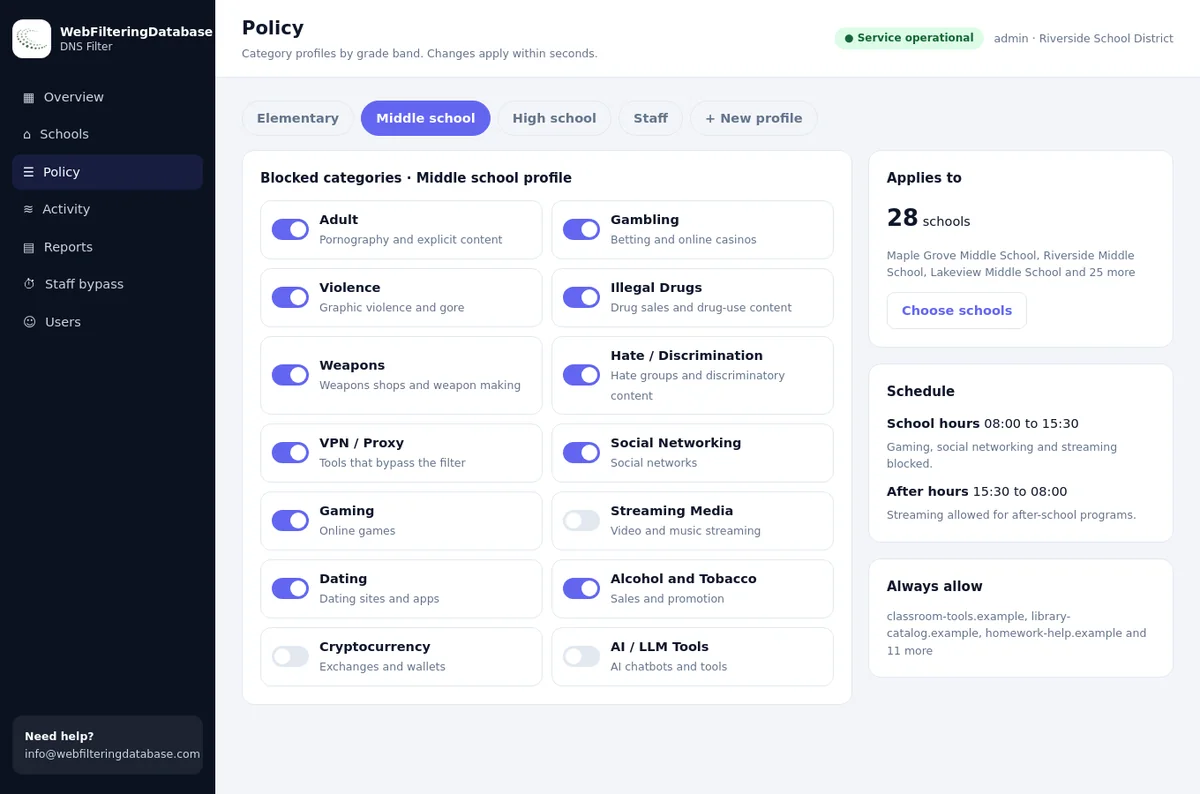
- Pick from 22 blocking categories for each site instead of taking a fixed profile.
- Open a wrongly blocked site for everyone in seconds with the always-allow list.
- See every blocked lookup, with the category that caused it, in the activity log.
What the free profiles usually block
Free filtering addresses come as a small menu of fixed profiles. You choose an address, and the address decides the rules.
Security profile
Known malicious and phishing domains are refused. Everything else, including adult content, resolves normally.
Family profile
The security list plus adult sites. Some services add proxy and VPN sites, others do not, and the address alone does not tell you which.
Adult-only profile
A few services block adult content without a security list. It suits a home more than an office that also worries about scams.
Forced SafeSearch
Some family addresses send the big search engines to their safe mode. That works only while the device keeps asking the same address.
The same profile serves every user of that address in the world. Its idea of "adult" or "malicious" is a compromise you cannot tune for your own network, and you will not see the list behind it.
Nine controls a free DNS filter leaves to you
None of these matter on day one. Each of them tends to matter by the end of the first month, usually because someone asked.
Your own categories
Gambling at work, dating on library PCs, VPN apps on guest Wi-Fi. A fixed profile has no switch for the category your manager just asked about.
An allow list
One supplier portal is blocked by mistake and the invoice is due today. Without an allow list, the only fix is to turn the filter off.
A block list
A site is causing trouble right now and the profile has not caught it. You need to block that one name today, not wait for someone else's update.
Rules per network
Staff, guests and public PCs need different rules. One free address on one router means one rule for everybody.
A record of blocks
Boards, insurers, funders and auditors ask what the filter does. A free address keeps no record you can open, export or file.
A block page that explains
People who see a bare error think the internet is broken and ring you. A branded block page tells them why and who to ask.
A staff unblock
A librarian or researcher sometimes needs an adult category for a few minutes. A staff bypass PIN does that and switches back by itself.
Bypass protection
Free addresses filter only the devices that ask them. Closing the routes around the filter is left to your own router and device settings.
Someone to ask
When a whole site breaks, a forum thread is slow comfort. A paid filter gives you a named team that can see your settings.
Five sites where one fixed profile gives the wrong answer for someone
Popular sites often sit in several categories at once. Each row below raises a policy question that a single family profile cannot answer for you.
| Site | Categories in our data | The question you may face |
|---|---|---|
| draftkings.com | Gambling, Sports & Recreation | Block betting at work but keep sports news open? |
| chatgpt.com | AI / LLM Tools | Allow it for staff, close it on public PCs? |
| reddit.com | Social Networking, Forums / Message Boards, Community Sites | Open for research, closed on guest Wi-Fi? |
| discord.com | Email and Messaging, Social Networking, Gaming | Fine for the youth club, not in the office? |
| tinder.com | Dating, Social Networking | Blocked on library PCs only? |
Who a free filter suits, and who it does not
Free filtering is a fair choice in some places. The test is simple: will anyone ever ask you to change a rule or prove what was blocked?
A free address is often fine for
- A single household that wants adult sites and scams kept out.
- A two or three person office with no client data rules and no guest Wi-Fi.
- A stop-gap for a few weeks while you choose a filter.
- A quick test of what breaks when lookups are filtered at all.
- A volunteer group whose devices are personal and unmanaged.
Plan for a managed filter if you run
- A public library or school that has to show its filtering to funders, a board or auditors.
- An office that handles client data under contracts or insurance questionnaires.
- A business with guest Wi-Fi next to the staff network.
- More than one site, or sites with different opening hours and audiences.
- Any network where you will be asked "why is this blocked?" more than once a month.
Six signs you have outgrown a free DNS filter
Most teams do not switch because of a plan. They switch after one of these happens twice.
You switch it off to let one site through
A blocked site you need can only be opened by removing the filter for everyone. Then someone forgets to put it back.
Nobody can say what was blocked
A manager or trustee asks for last month's blocks and the answer is a shrug. With a managed filter, the monthly filtering report arrives by email.
Guests and staff share one rule set
The rules are either too loose for public Wi-Fi or too tight for staff. Profiles per network settle that argument.
You find out about a bypass from a complaint
A device with its own DNS setting or a browser with secure DNS has been skipping the filter for weeks. Nobody noticed, because nothing records it.
A category the profile ignores becomes a problem
Betting at lunch, VPN apps on the guest network, or client files pasted into AI tools. You need the gambling, VPN and proxy or AI tools switch, and there is none.
You take on a second site
Two routers, two sets of settings, no shared view. Each new site doubles the guesswork about what is filtered where.
The bypass gap: why a free address filters less than you think
A DNS filter only sees the lookups that reach it. A free address on the router covers devices that use the router's DNS, and nothing else.
A device with its own DNS
Laptops and phones can be set to any DNS server. The router's free address is never asked, so nothing is filtered on that device.
Secure DNS in the browser
Modern browsers can send lookups over an encrypted connection to a public service. The network's DNS never sees them, which is the point of the feature.
VPN and proxy apps
A VPN app sends all traffic, lookups included, through its own servers. If the profile does not block VPN sites, the app installs and runs.
| Route around the filter | With a free address on the router | With our managed filter |
|---|---|---|
| Own DNS on a device | Not seen, not stopped | Router steps that send DNS only to the filter |
| Browser secure DNS | Not seen, not stopped | Public encrypted DNS services blocked by default |
| VPN and proxy apps | Depends on the profile you picked | VPN / Proxy / Anonymizers is a switch you control |
| Laptops away from the office | Filtered only if set by hand | A private encrypted link keeps the same rules |
For the details of the encrypted lookup problem, read DNS over HTTPS and web filtering. For the apps themselves, see how to block VPN apps on your network.
How the managed filter handles bypass for you
Public encrypted DNS services and the browser settings that skip a network filter are blocked by default, so a secure DNS switch in a browser does not quietly undo your rules. Devices that leave the building keep the same policy through a private encrypted link.
Read the privacy terms before you point a network at any DNS service
Every website name your people visit passes through the DNS service. Ask these six questions of any provider, free or paid, including us.
What is logged?
Only counts, or every domain with the address that asked? The second can identify a person on a small network.
For how long?
Hours, days or years. Short retention is kinder to staff; your own reports may need a month or more.
Is it shared or sold?
Some free services fund themselves with data or upgrades. Read the section on partners and analytics, not only the headline promise.
Where is it stored?
The country of storage decides which law applies. Offices under EU or UK data rules should check this first.
Can you delete it?
Ask whether you can remove your records when you leave, and how long backups keep them.
Who can see your settings?
On a shared free address the answer is nobody, including you. On an account, check who on your side can change rules.
Our own commitments are in the data privacy statement. If you write a staff policy, say plainly that the filter records domains, not page contents or messages.
Moving from a free service to a managed filter in one afternoon
The switch is a DNS change, so it can be undone in a minute. Do it one network at a time and keep notes.
- 1
Write down today's DNS settings
Note the addresses on each router and any device set by hand. That is your way back if you need it.
- 2
Collect the sites people asked you to open
Every "please unblock" email from the past months belongs on your first always-allow list. You can import allow and block lists in one go.
- 3
Choose categories for each network
Start with what the free profile did, then add the switches you missed. Guests and public PCs usually get the stricter profile.
- 4
Change the router's DNS to the address we give you
Devices pick up the new setting as their connection renews. Restart a test laptop to see it at once.
- 5
Send DNS only to the filter
Follow the router steps in the dashboard so devices with their own DNS setting cannot skip it. This closes the first bypass route above.
- 6
Read the activity after a week
Look for blocks nobody expected and for sites that should have been blocked. Adjust once, then leave it to the monthly report.
What "free" costs you in staff time
The price of a free filter is paid in small tasks that only you can do. Count them for a month before you decide.
Unblock requests
Each one means turning the filter off, or telling the person no. Both take longer than ticking an allow list.
"What was blocked?"
Without records, every question from a manager or parent becomes an investigation on the device itself.
Bypass clean-up
Finding the laptop that skipped the filter, and why, is detective work. A log that shows stopped bypass attempts turns it into a quick check.
Second site
Every extra router repeats the setup and doubles the guesswork. One dashboard for all sites removes the repetition.
A free filtering address next to our managed filter
Both start with one DNS setting on the router; this is where they part ways.
| Task | Free filtering address | Managed DNS filter |
|---|---|---|
| Choosing what is blocked | Pick one of a few fixed profiles | 22 blocking categories, set per site |
| Fixing a wrong block | Switch the filter off or live with it | Add the domain to the always-allow list, applied in seconds |
| Staff who need adult research | No option | PIN bypass for 15, 30 or 60 minutes, logged, switches back |
| Proving what the filter did | No records for you | Searchable activity, reports and CSV exports |
| Laptops away from the network | Set each device by hand | Private encrypted link with the same rules |
| Several sites | One router at a time | One dashboard for many sites |
Free DNS filtering: questions people ask
Is a free DNS filtering service good enough for a small office?
For a very small office with no client data rules and no guest Wi-Fi, a free filtering address can be a reasonable start. Once you need your own categories, an allow list, a record of blocks or different rules for staff and guests, a free address cannot provide them.
What does a free DNS filter block?
Most free filtering addresses offer a fixed profile: a security profile for known malicious domains, a family profile that adds adult sites, and on some services forced SafeSearch. You cannot change what the profile contains.
Can people get around a free DNS filter?
Yes. A free address only filters devices that ask it for lookups. A device with its own DNS setting, a browser with secure DNS switched on, or a VPN app goes around it unless the network blocks those routes.
Can a library or school rely on a free DNS filter for CIPA?
CIPA asks for a technology protection measure and an internet safety policy; it does not name a product. Libraries and schools also need to show what is blocked and to let adults unblock for research, which free addresses do not record, so check the details with your E-Rate adviser.
Does DNS filtering slow down the internet?
A well-run DNS filter answers in milliseconds, so people do not notice it. A distant or overloaded resolver can add delay to the first visit of each site, which is one more thing to test before you commit a whole network.
What is the cheapest paid alternative to a free DNS filter?
Our managed DNS filter starts at $99 a month for one site on a monthly agreement, with category switches, allow and block lists, a staff PIN bypass and reports. Several sites are priced by quote, and a pilot on one site is available.
Can I keep a free service on one network and a managed filter on another?
Yes. The DNS setting lives on each router or network, so you can move one network first, compare the results for a week, and move the rest when you are ready.
One site starts at $99 a month on a monthly agreement, and groups of sites are priced by quote. A pilot on one site lets you put the blocks and reports next to what your free service did before you commit.
Outgrown the free address?
Tell us how many sites and networks you run and what the free service blocks today. We will set up a pilot and send you the DNS address to try.